Live Nation At The Concert
- 4.5
- Rating
- 1.00M
- Installs
- Free
- Price

 Analysis by App-foxy
Live Nation At The Concert is the kind of music app I reach for when a song stops being enough and I want to find the people, places, and tickets connected to live music. Developed by Live Nation Worldwide, Inc., it focuses on discovering concerts and handling the ticket-search part of going out. That sounds straightforward, but the real value appears when I use it during the awkward in-between moments: hearing about an artist while travelling, checking what is happening near me, or trying to turn a vague plan into an actual night out.
As a free app in the Music & Audio category, it is easy to try without making a financial commitment just to see whether it fits my concert habits. Its Everyone age rating also makes it approachable for households where different people share recommendations and event planning. I found the experience most useful when I treated it as a live-music discovery and ticket companion rather than as a replacement for a streaming service or a complete personal music library.
How Live Nation At The Concert Works When You Are Connected
The app makes the most sense with a reliable connection. Concert discovery is naturally current: venues, event details, ticket availability, and local suggestions are the sort of information that can change while I am deciding what to do. A network connection lets the app refresh that information instead of leaving me to rely on an old screenshot, a remembered search, or a separate browser tab that may no longer reflect the event.
You May Also Like

 Blood Strike: 2.5 Anniversary
Blood Strike’s Loadouts Turn Every Drop Into a Tactical Gamble
A close look at Blood Strike’s custom loadouts: how fast access to signature weapons reshapes its battle royale rhythm, rewards preparation, and narrows the gap between fights.

 Pandora - Music & Podcasts
Pandora’s Music Is Easy to Start, but Harder to Recover
Pandora’s strength is its low-effort path from a seed to a station. Its weak spot is how much confidence it asks you to place in connection, setup, and quiet recovery.

 8 Ball Pool
 Is Built on Rivalries, Rematches, and Routine
A close look at the rivalries, rematches, shared routines, and unanswered safety questions that turn a quick pool match into a persistent mobile community.

 Samsung Music
’s Quiet Strength Is Playing What You Already Own
Its reach comes less from spectacle than from dependable access to a personal library. That simplicity is both the app’s strongest retention engine and its ceiling.

 AccuWeather: Weather Radar
AccuWeather Review: A Quick, Clear Forecast for Everyday Decisions
For everyday plans, the best forecast is the one you can understand quickly. AccuWeather makes rain timing, radar, and local conditions easy to act on, with a few trade-offs.

 Hill Climb Racing
Why Hill Climb Racing Still Turns Crashes Into One More Run
A tiny car, a bumpy hill and one more upgrade: Hill Climb Racing keeps resurfacing because its simple chaos makes every near-miss feel personal.
More From Our News Desk



That dependence is not automatically a flaw. In this category, the useful information is usually the information that changes. A ticket page that was accurate yesterday may not tell me what I need today, and an event list saved in another app can become misleading. The trade-off is that the app feels much more capable when I am online and much less useful when I am somewhere with weak reception. I would not make it my only plan for the final minutes before entering a venue.
My preferred workflow is to browse while I have a stable connection, narrow down the artist or event, and then revisit the important details before leaving. This avoids one common mistake: assuming that finding an event is the same as being ready for it. Discovery is the relaxed part. Ticket decisions and arrival planning deserve a second check closer to the show.
The connection also shapes how quickly I can move between ideas. I might begin with a familiar performer, notice another act appearing in the same general area, and then compare options. That fluid browsing is more convenient than opening multiple unrelated searches, especially when I do not have a precise date in mind. However, if I already know the exact event and only need a confirmation, a direct browser search may feel faster than exploring the app from the beginning.
Useful in the small gaps of a busy day
The strongest mobile scenario for me is a short planning session. Imagine finishing work and realizing that a friend mentioned a concert happening later in the week. I can open the app, look for the artist, check the available event information, and decide whether it deserves a longer conversation with my friend. I do not need to turn the search into a full evening of research.
It is also handy when plans change. A cancelled dinner, an unexpected free evening, or a weekend in another city can turn a general music interest into a practical search. The app gives that impulse somewhere useful to go: instead of wondering who might be playing, I can investigate live options and decide whether a ticket is worth pursuing.
I would especially recommend it to people who enjoy concerts but do not follow every venue individually. Keeping up with venue calendars, artist pages, social posts, and ticketing pages can become fragmented. Having a single starting point reduces that mental load. It does not remove the need to read event information carefully, but it makes the first step less scattered.
There is a different audience for whom it may be less compelling. If I mainly listen to albums, podcasts, or radio and rarely attend shows, a dedicated streaming app will probably serve me better. Likewise, someone who already has a fixed routine built around one local venue may prefer that venue’s own communication channels. This app earns its place when discovery matters, not merely when I need another music icon on my phone.
What the mobile format gets right—and where it slows me down
A phone is a natural device for this task because concert plans often happen away from a desk. I can discuss an artist with a friend, search while commuting, or check possibilities during a break without waiting until I am home. That immediacy is more important than a large-screen presentation for casual discovery.
At the same time, a small screen makes comparison more tiring. If I am weighing several events, checking dates, thinking about travel, and discussing ticket choices with someone else, I may prefer a larger browser window. The app is better for quick movement and spontaneous decisions than for building a detailed multi-event spreadsheet in my head.
One practical habit helps: I avoid making a purchase decision while distracted. I use the mobile app to find the event and understand the basic choice, then slow down before committing. I check the artist, venue, date, and the event details shown at that moment. This is not a criticism unique to Live Nation At The Concert; it is simply the sensible way to use a ticket-focused mobile tool, where a fast tap can have consequences.
The current version is 11.0.0, and the app supports operating systems from version 9 onward. That broad compatibility makes it easier for people using older devices to consider, although the quality of the experience will still depend on the phone, its connection, and how comfortably its screen handles the interface. I would keep the app updated when possible, particularly because event-related services benefit from current software even when the basic browsing task looks simple.
When the connection fails at the wrong moment
The most important limitation is easy to understand: a live event app is vulnerable to the conditions around a live event. Reception can be crowded near a venue, mobile data can be inconsistent while travelling, and indoor coverage may not behave as expected. If I wait until I am standing in a queue to find the event again, I am creating avoidable stress.
I handle this by preparing before I leave. I review the event while connected, keep the relevant information easy to find on my phone, and avoid assuming that a page will load instantly at the entrance. I also make sure I know which event I am attending rather than relying on memory after browsing several similar listings. These small steps turn a network-dependent experience into a more dependable routine.
That preparation matters even more when I am coordinating with friends. One person may have the ticket information while another is trying to confirm the venue or timing. If the connection disappears, uncertainty spreads quickly. I prefer to settle the basic meeting plan before travelling, rather than making the app responsible for every decision once we are already on the move.
Recovery after a failed load is usually a matter of patience and a better connection, but the emotional effect depends on timing. A slow refresh during casual browsing is harmless. A slow refresh when I am comparing an event or trying to retrieve something important feels much more serious. This is why I see the app as excellent for preparation and discovery, but not as a reason to abandon ordinary planning habits.
Using it carefully on mobile data
I do not need to keep the app open constantly. For most people, a deliberate search is more sensible than repeatedly refreshing event pages throughout the day. I browse when I have a clear question—what is happening, where an artist is appearing, or whether a possible plan is worth investigating—and then close the app when I have enough information to decide my next step.
That approach is useful for two reasons. It keeps the experience focused, and it avoids turning every spare moment into another round of loading pages. If I am travelling, I prefer to search while connected to a dependable network and then use the resulting information to plan the outing. I would not assume that every useful page will remain available without a connection, so I prepare the details I expect to need before leaving.
There is also a privacy and attention trade-off in any location-aware discovery habit. The more I ask a service to help me find nearby events, the more convenient local discovery can feel, but I still prefer to search with a specific area or artist in mind when that is practical. The app works well as a deliberate tool; I do not need to let it dictate every music decision based on whatever happens to be closest.
For people with limited data, the best routine is simple: use Wi-Fi for broad browsing, avoid unnecessary repeated searches, and make the final check when the connection is stable. I would not describe this as a reason to avoid the app. It is a reminder that ticket and event information is more useful when I approach it intentionally instead of treating the phone as an always-on concert desk.
How it compares with other ways to find concerts
The usual alternative is a mixture of search engines, artist websites, venue calendars, social media, and ticketing services. That mixture can be powerful, especially when I want to verify information from several places, but it is also fragmented. Live Nation At The Concert gives me a more focused starting point for live-music discovery and ticket-related planning.
A streaming service is better when my main goal is to listen immediately, build playlists, or receive recommendations based on my listening history. It may help me discover an artist, but it is not necessarily the most direct path from that discovery to a concert plan. This app reverses the priority: the live event is the destination, and the music search supports that goal.
A venue-specific app or website can be better when I already know exactly where I want to go. It may offer a more concentrated view of one location’s schedule. Live Nation At The Concert is more useful when my question is broader: which artists or events should I investigate, and what live options might fit my plans?
Social media remains valuable for announcements and artist updates, but it can be noisy and inconsistent as a planning tool. I may hear about a show there, yet still want a clearer route to the event and ticket information. The app helps turn that initial discovery into something more actionable, though I still read the details carefully instead of treating any single screen as a substitute for judgment.
Who should install it, and who should skip it
I would recommend it to regular concertgoers, people who like discovering performers through live events, and travellers who want a convenient way to investigate shows in a new area. It is also a good fit for friends who make spontaneous plans and need a shared starting point rather than several disconnected searches.
I would skip it if I almost never attend concerts, if I only want offline music playback, or if I need a comprehensive personal audio library. It is not the right answer to those problems. I would also hesitate if my internet access is unreliable and I am unwilling to prepare event details in advance. The app can support planning, but it cannot remove the practical limits of a weak connection.
The free price lowers the barrier to testing it, and the service has built a substantial audience, with more than a million installs and an average rating of 4.5 from roughly twenty-five thousand ratings. Those figures suggest that the basic idea works for many people, but they do not replace my own test: the value depends on whether live music is a regular part of my life.
My verdict on the connected concert experience
After using Live Nation At The Concert as a practical concert-discovery tool, I see its main strength in reducing the distance between “that artist sounds interesting” and “could I actually see them live?” It is convenient on a phone, especially during spontaneous planning, and its focus is clearer than that of a general music app.
Its biggest weakness is equally clear: the experience depends on timely access to online information. I would not wait until the last possible moment to load an event page, and I would not rely on the app alone for every detail once I am at a crowded venue. Preparing while connected is part of using it well.
My practical recommendation is to use it as the discovery and planning hub, then make your final checks before you travel. That balance gives me the convenience of mobile concert searching without pretending that connectivity is guaranteed everywhere. For anyone who regularly turns music into nights out, this free app is worth trying; for listeners who want playback first and live events only occasionally, a different music tool will probably feel more natural.
Live Nation At The Concert is available for Everyone and comes from Live Nation Worldwide, Inc., which makes its purpose immediately understandable: it is built around the live-music outing rather than passive listening. I would keep it installed if concerts are part of my routine, while remembering that the best experience comes from using it thoughtfully—search early, verify the event, plan around the connection, and let the app help with discovery without handing over every part of the evening.
FAQs for Live Nation At The Concert
01What is Live Nation At The Concert?
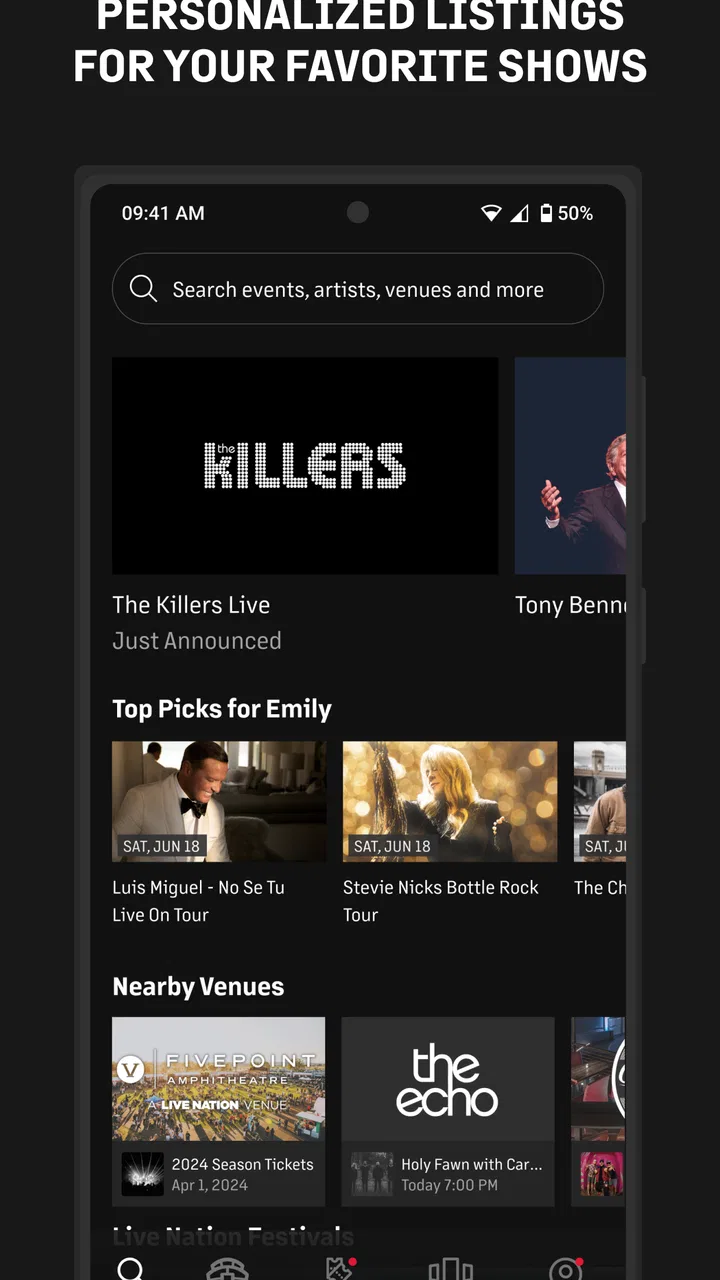
Live Nation At The Concert is an event-focused app designed to help users discover concerts, festivals, and other live entertainment events. It can provide information about artists, venues, dates, tickets, and event details in one place. The exact features may vary by country, location, and the specific Live Nation services available in your region.
02Can I buy concert tickets through Live Nation At The Concert?
In supported markets, the app may allow you to browse upcoming events and continue to an official ticket-purchasing process. However, ticket availability, purchasing options, presales, fees, and delivery methods depend on the event and region. Before completing an order, carefully review the final price, seating information, refund policy, and any applicable terms.
03Does the app use my location?
Live Nation At The Concert may request location access to show concerts and venues near you, recommend local events, or display region-specific information. Location permission is generally optional, and you may still be able to search manually by artist, city, or venue if you decline it. You can change this permission later through your Android or iOS settings.
04Do I need an account to use Live Nation At The Concert?
Some basic features, such as exploring artists or viewing event information, may be available without creating an account. An account can be required for functions such as ticket purchases, order management, saved events, personalized recommendations, or receiving notifications. Registration details and available sign-in methods may differ depending on your country and the services connected to the app.
05Is Live Nation At The Concert free to download and use?
The application may be free to download, but using it can involve costs connected with concert tickets, booking fees, delivery charges, memberships, or optional event-related services. Prices are not determined solely by the app and can differ between events. Check the listing and the checkout screen for current charges, supported payment methods, and any subscription conditions before confirming a purchase.
Pros
- Official ticket access for many major concerts and festivals.
- Event details include dates
- venues
- lineups
- and useful show information.
- Personalized recommendations help discover nearby events and artists.
- Mobile tickets can simplify entry at participating venues.
- Notifications can alert you about presales and newly announced shows.
Cons
- Ticket availability and features vary by country and event.
- Popular tickets may sell out quickly during high-demand presales.
- Fees and final prices may only become clear late in checkout.
- Some users report occasional app or ticket-loading issues.
- The app may request location and notification permissions for full functionality.

Live Nation At The Concert
Gallery